
Collections
What a Collection does
A Collection groups several flows behind one entry point. When a document arrives, Tavnit looks at its first page, compares what it sees against the names and descriptions of the flows in the Collection, and forwards the document to the one that matches — so you can hand out a single address for documents you cannot sort in advance.
The routing decision is made from the document itself: headers, titles, logos, layout, and identifying text such as company names and form numbers. It is a classification step, not an extraction step — once a destination is chosen, the document is processed by that flow exactly as if you had sent it there directly.
Collection or direct flow?
Send documents straight to a flow when you already know what they are. Use a Collection when the sender is one channel but the contents vary, and deciding which flow applies would otherwise be somebody's manual job.
| Situation | Send to |
|---|---|
| One supplier, one document type, always the same layout | The flow directly |
| A vendor portal that emits invoices, POs and receipts | A Collection |
| A shared inbox where anything might arrive | A Collection |
| An API caller that already knows the document type | The flow directly |
| A PDF that bundles several documents together | A Splitter — or a Collection containing one |
Routing costs a credit per document, so it is not free to route something you could have addressed directly. Where the caller knows the type, tell the flow.
Create a Collection
A Collection is a name, a list of destinations, and a fallback. The work is in the destinations: routing quality depends almost entirely on how well each flow describes what it handles.
- 1Open Collections and create a new one. Name it after where the documents come from — Acme supplier portal, not Collection 2.
- 2Add every flow that should be a possible destination.
- 3Set a Fallback Flow for documents that do not match anything clearly. Leave it empty and unroutable documents are cancelled instead.
- 4Send documents in by email, manual upload, or API.
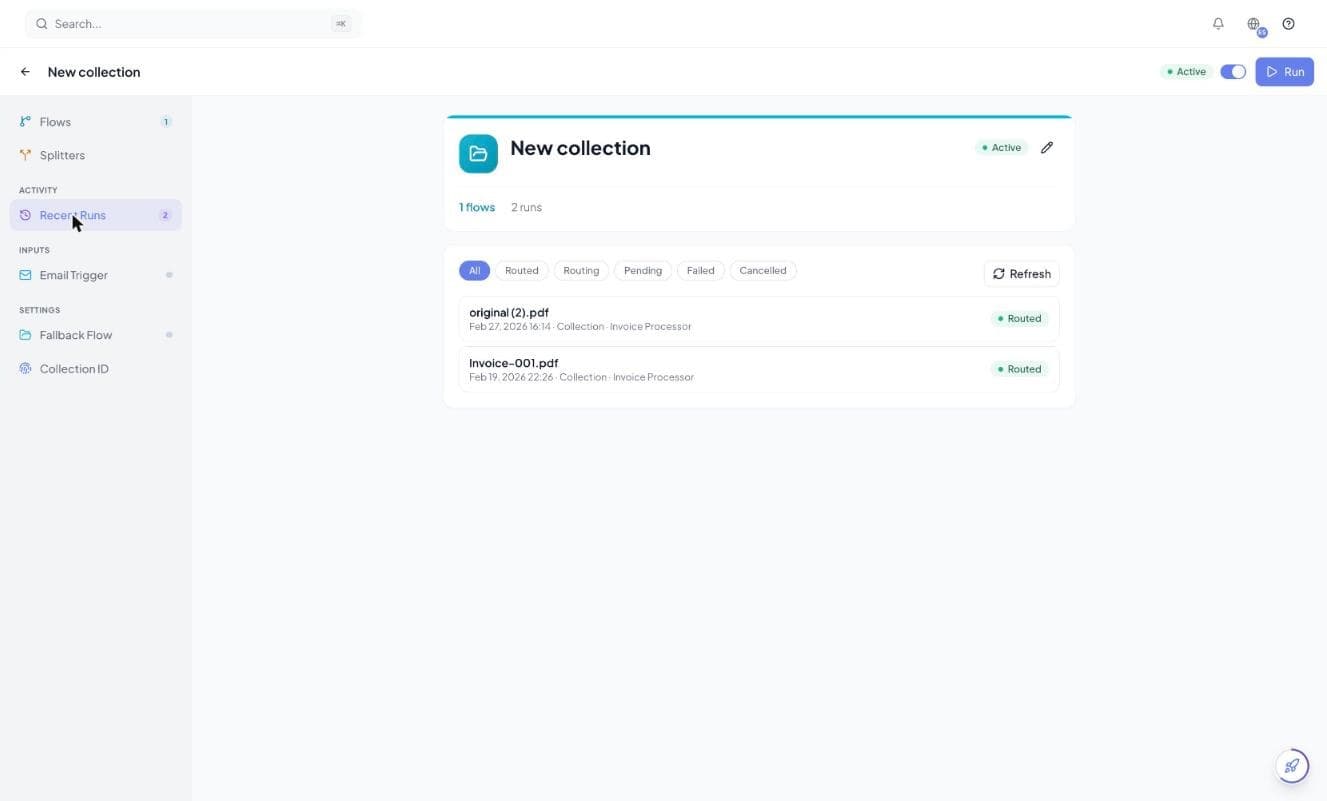
- 5Open the Collection's runs and read the routing reasons, then sharpen any description that produced a wrong decision.
Writing flow names and descriptions that route well
The name and description of each flow are the only things the router compares the document against. A flow called Flow 3 with no description cannot be routed to reliably, no matter how distinctive the document is.
| Instead of | Write |
|---|---|
| Invoices | Acme Corp supplier invoices — blue letterhead, “TAX INVOICE” in the header, line items with part numbers |
| Shipping | Bill of lading from ocean carriers — container numbers, port of loading and discharge |
| Other docs | Delivery notes — no prices, signature block at the bottom |
- Describe what is visible on page one, since that is what the router sees.
- Name the issuer when several flows handle the same document type for different suppliers.
- Say what a document type is not, when two of your flows are easily confused.
- Avoid two flows whose descriptions overlap — the router is instructed to abstain when the match is ambiguous rather than guess.
What happens to each document
Every document creates a Collection run that moves through a small set of states. Routing is decided once, from the first page, and the outcome is recorded with a written reason you can read afterwards.
| Status | Meaning |
|---|---|
| Pending | The document is stored and waiting to be routed. |
| Routing | The first page is being classified. |
| Routed | A destination was chosen. The Collection run links to the flow run it created. |
| Cancelled | No destination matched and no Fallback Flow was set, so nothing was processed. |
| Failed | The document could not be routed at all — an unsupported file type, an unreadable file, a Collection with no active destinations, or an empty credit balance. |
When the router cannot find a clear match it does not guess — it abstains. If a Fallback Flow is set, the document goes there and the run records that it fell back. If none is set, the run is cancelled and the document is not processed at all. Set one unless you genuinely want unknown documents dropped.
Routing does not produce a confidence score. Each decision is recorded as a written reason citing what the router saw on the page — read those on the Collection's runs to work out why a document went where it did.
Routing to a Splitter
A Collection's destinations are not limited to flows. You can add a Splitter as a destination, so a file that bundles several documents is split apart first and each part is routed onward — rather than being extracted as though it were one document.
- Splitter destinations are described to the router as splitters, so it only picks one when the file clearly bundles multiple documents.
- A single document is always sent to a flow, never to a splitter.
- Each part produced by the splitter continues through the pipeline on its own.
A Splitter can feed a Collection and a Collection can feed a Splitter, which could form a cycle. Tavnit refuses configurations that would loop, and at run time a segment produced by a Splitter is never routed back into that same Splitter — so a mis-set configuration cannot spin documents in a circle and burn credits.
What routing costs
Routing is charged one credit per document, taken when the Collection run starts and independent of the outcome. The classification runs whether or not it finds a match, so a cancelled run still costs its routing credit.
| Charge | When |
|---|---|
| 1 credit | Per document routed by a Collection — matched, defaulted or cancelled. |
| The flow's own charge | On top, once the document reaches a flow and is extracted. |
If the balance is empty when a document arrives, the Collection run fails before routing and nothing is processed.
Sending documents to a Collection
A Collection accepts documents the same three ways a flow does: its own email address, manual upload in the app, or the API. The routing behaviour is identical whichever you use — the run records which trigger it came from.
- 1Open the Collection's settings.
- 2Enable the Email Trigger and copy the Collection's address.
- 3Forward documents to it, or point a mailbox rule at it.
The address is distinct from any flow address — see email integration for the address shapes, accepted attachment types and what happens to attachments that cannot be processed.
Reviewing routing decisions
The Collection's runs list is where you tune routing. Every entry shows the document, where it was sent, and the reason the router gave — which is what tells you whether to fix a description or accept the decision.
- Which flow or splitter each document was sent to, and whether that was a match or a fallback to the default
- The written reason, citing what the router saw on the first page
- A link through to the resulting flow run and its extracted data
When routing goes wrong the fix is nearly always in the destination descriptions, not in the document. Two flows that both say “invoices” will keep producing ambiguous decisions until one of them says what makes it different.